
NDT Request and NDT report
NDT Request
The NDT Request Add tab helps you to create NDT request in mobile and sync the details to the web application.
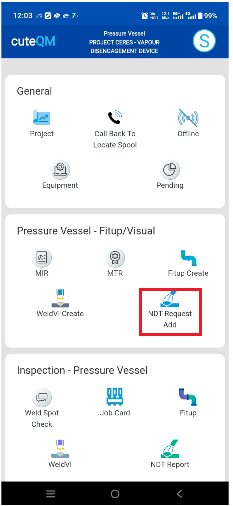
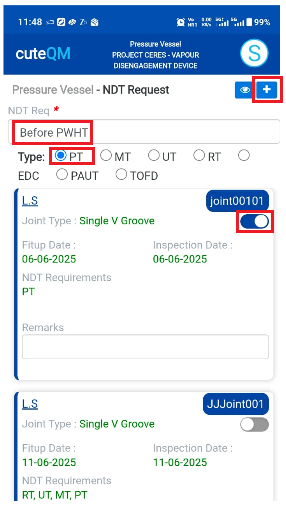
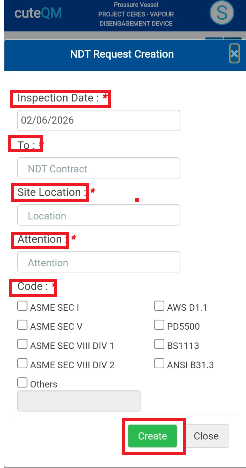
To create NDT Request request,do the following
- Take offline data for NDT Request.
- Click NDT Request Add menu
- Here joints listed to create the NDT Request
- Select the NDT request type from the dropdown(Before fitup/Before pwht,after pwht etc)
- Select the Type of the NDT (RT/UT/PT/MT etc)
- Select the joints
- Click the + icon placed at the top
- This will navigate to add popup
- Select the inspection date
- Select the NDT contractor
- Select the site location from the dropdown list
- Select attention
- Select the appropriate code for the NDT Request
- Click Create
NDT Request created successfully.
NDT Report
The NDT Report tab helps you to create NDT reports in mobile and sync the details to the web application.
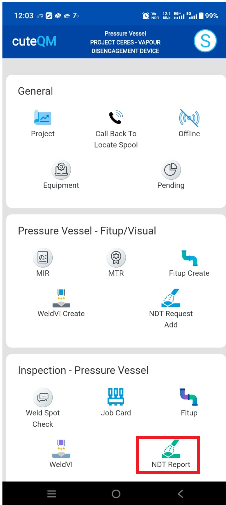
- Take offline data for NDT Report.
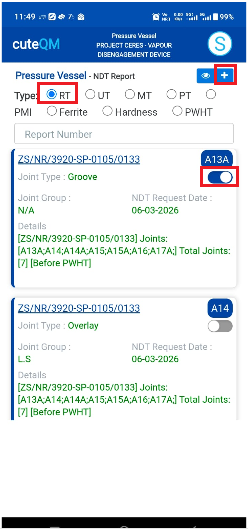
- Click NDT Report menu
- Here joints listed to create the NDT Report based on NDT type
- Select the Type of the NDT report
- Select the joints
- Click the + icon placed at the top
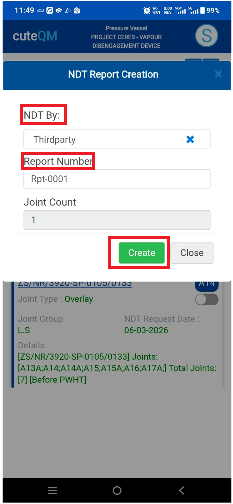
- This will navigate to add popup
- Select the NDT By from the dropdown list
- Enter the Report number
- Click Create
NDT Report created successfully.
No Comments